Kidswear Wholesale Catalog Template
Show retailers the styles, size packs, and prices they need to place a kidswear order. This colorful A4 landscape template turns your product list and photos into a wholesale catalog.
- A4
- Landscape
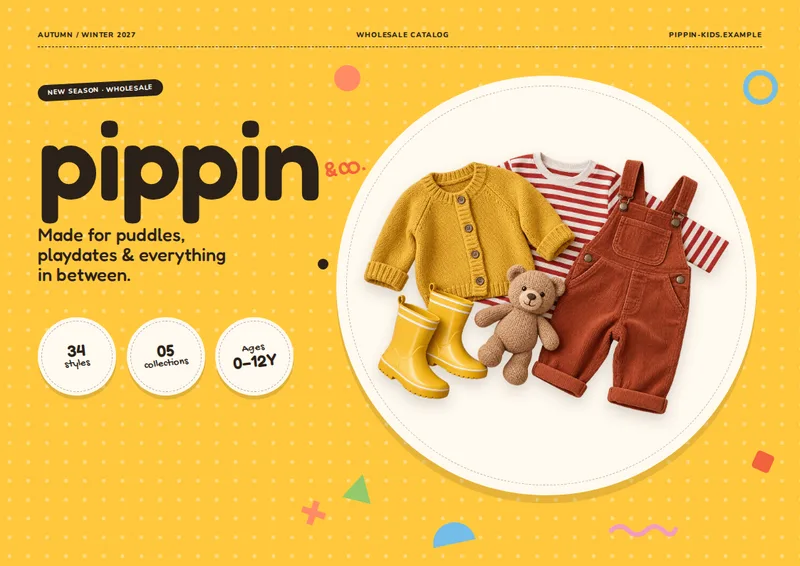
Inside the kidswear wholesale catalog template
Built for kidswear catalogs
- Colorful A4 landscape pages
- Photo-led category pages with up to three styles each
- Welcome page explaining size packs
- Per-piece wholesale prices and calculated pack totals
- Consolidated pack price list
Columns your spreadsheet needs
One row per product. Name your columns like this, or map your own column names when you connect the spreadsheet.
| Column | What goes in it | Example |
|---|---|---|
style_no | Style number | BB-101 |
name | Product name | Sprout Knit Romper |
image | Product image | BB-101.png |
category | Category | Baby |
age_range | Age range | 0–24M |
pack_size | Pack size | 6 |
assortment | Size assortment | 0-3M:1, 3-6M:1, 6-12M:2, 12-18M:1, 18-24M:1 |
colors | Colors | Sage; Oat; Rose |
fabric | Fabric | 100% organic cotton knit |
badge | Badge | New |
wholesale_price | Wholesale price | 12.5 |
msrp | MSRP | 32 |
A catalog built for kidswear buyers
Playful Kids Wholesale gives small kidswear brands and distributors a way to present a collection without squeezing product details into a plain price table. The finished catalog opens with a colorful cover, followed by a welcome page that explains how the size packs work. Category sections then give buyers room to browse products before they reach the consolidated pack price list. A back cover closes the document.
Each category page uses a bright heading and shows up to three styles. Product photos sit alongside the style name, style number, age range, fabric, colors, pack size, and size assortment. A badge can call out a style marked “New.” The layout makes it easier to compare a baby romper with other styles in its category while keeping the ordering details nearby.
Make pack quantities clear
Kidswear orders often depend on the mix of sizes inside a pack, not just the price of one piece. The welcome page uses a product from your list to illustrate its pack size and assortment. For example, a six-piece pack might contain one 0–3M, one 3–6M, two 6–12M, one 12–18M, and one 18–24M piece. That gives a buyer a reference before they browse the collection.
The category pages display the wholesale price per piece and the pack total, along with MSRP when supplied. Colors and age ranges appear with each style, so a buyer can check available options without searching through a separate spreadsheet.
Put the full price list at the end
After the photo-led category pages, a pack price list gathers styles into compact rows. It includes category, style number, product name, pack size, size assortment, wholesale price, calculated pack total, and MSRP. This gives buyers a quick ordering reference after they have seen the products.
Add one row per style to your Excel, CSV, or Google Sheets product list, and provide the corresponding product photos. Use the category column to organize sections and the assortment column to spell out the sizes and quantities in each pack. The result is a print-ready PDF catalog suited to sharing a kidswear range with wholesale buyers.
Kidswear Wholesale Catalog Template, answered
What does a buyer see before the product pages?
The catalog starts with a cover and a welcome page. The welcome page uses one style as an example to explain pack size and the quantities in its size assortment.
How are styles organized?
Styles are grouped by the category in your spreadsheet. Each photo-led category page shows up to three styles; categories with more styles continue onto additional pages.
Is the wholesale price for one piece or a full pack?
Enter the per-piece price in wholesale_price. The catalog displays that price and calculates the pack total using pack_size.
Where can buyers find all pack prices together?
A consolidated price list follows the category pages. Its rows include each style’s pack size, size assortment, per-piece wholesale price, pack total, and MSRP.
How do I add product photos?
Put each photo’s filename in the image column and provide the corresponding photo with your product list.
More templates like this
Make your wholesale catalog from your spreadsheet
Start from this template, replace the sample data with your products and export a print-ready PDF.