Ceramic Tile Catalog Template
Present ceramic tile collections in a warm, retro-inspired A4 catalog. Add tile textures and room photos to your spreadsheet to build collection pages, product listings, and price tables.
- A4
- Portrait
- 17 pages
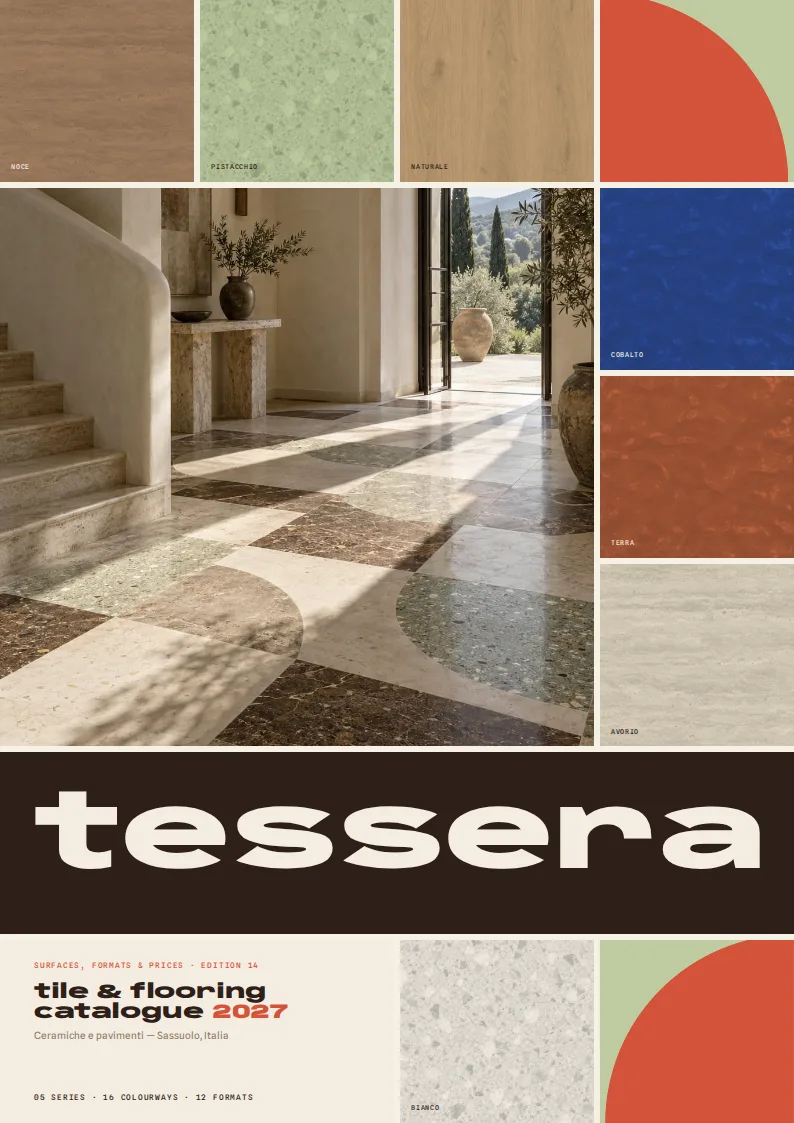
Inside the ceramic tile catalog template
Built for ceramic tiles catalogs
- A4 portrait cover with a grid of tile colorways
- Visual format and thickness chart
- Illustrated laying-pattern and finish guide
- Room-photo openers and SKU tables for each series
- Series-grouped price pages and an ordering example
Columns your spreadsheet needs
One row per product. Name your columns like this, or map your own column names when you connect the spreadsheet.
| Column | What goes in it | Example |
|---|---|---|
sku | SKU | TRV-6012-AV |
name | Product name | Travertino Avorio 60×120 |
series | Series | Travertino |
image | Tile image | TRV-6060-AV.jpg |
room_image | Room image | TRV-6012-NO.jpg |
format | Format | 60×120 cm |
thickness | Thickness | 10 |
finish | Finish | Honed |
colour | Color | Avorio #E7DCC6 |
m2_per_box | Coverage per box | 1.44 |
price_per_m2 | Price per m² | 58.9 |
use | Intended use | Floor & wall, indoor |
slip | Slip rating | R10 |
pattern | Laying pattern | Stack bond |
series_note | Series note | Roman travertine, pressed into porcelain. |
Show the collection before the individual tiles
This ceramic tile catalog template opens with a grid of colored tile surfaces, followed by an introduction and contents page. Each series then gets its own opener with a room image, a collection note, and a preview of its colorways. It gives tile brands, flooring distributors, and manufacturers a way to introduce the look of a range before buyers compare individual SKUs.
Make formats and installation choices easy to scan
A formats page pairs a visual size chart with format names and thicknesses. A separate guide illustrates the laying patterns found in your spreadsheet and lists the finishes in the range. These pages put useful selection details near the front of the catalog, where a showroom buyer or specifier can find them without searching through every product listing.
Give each series a structured product range
After its opener, each series has a range page with tile images, a room photo, and a SKU table. Product rows bring together the item name, color, format, thickness, finish, coverage per box, intended use, slip rating, laying pattern, and price per m². The series note supplies context for the collection, while the listing gives buyers the details they need to identify a specific colorway and size. Series appear in spreadsheet order, so you can control the catalog’s sequence from your data.
Keep ordering details with the prices
Dedicated price pages group SKUs by series and show format, finish, color, box coverage, and price per m² in compact tables. An ordering page includes a worked area-and-box calculation using the catalog data, alongside terms. A final tile grid closes the PDF with another view of the range.
The layout is set up for A4 portrait printing; the supplied sample renders as 17 pages. Enter one SKU per spreadsheet row, group related products under the same series, and provide image and room_image file references where you want tile and application photography to appear.
Ceramic Tile Catalog Template, answered
Can I group several colorways under one tile collection?
Yes. Give those SKU rows the same `series` value. The catalog groups them into a collection opener, range pages, and a section of the price tables.
Where do tile and room photos appear?
Use `image` for the tile surface and `room_image` for an application photo. The layout uses imagery on the cover, collection pages, and product range pages.
Does the catalog include tile sizes and thicknesses?
Yes. The `format` and `thickness` columns feed a visual formats page and appear with product details.
How are prices displayed?
Enter each SKU’s `price_per_m2`. Prices appear in the product listings and in dedicated tables grouped by series, alongside coverage per box.
Is the catalog always 17 pages?
No. The supplied sample renders as 17 A4 pages. The number of series and SKUs in your spreadsheet determines how many collection, range, and price pages are needed.
More templates like this




Make your product catalog from your spreadsheet
Start from this template, replace the sample data with your products and export a print-ready PDF.