Lighting Catalog Template
Present your lighting collections in an A4 portrait catalog that pairs atmospheric imagery with the specifications buyers need. Add product rows and photos to build family pages and a code-to-price index.
- A4
- Portrait
- 1–100 pages
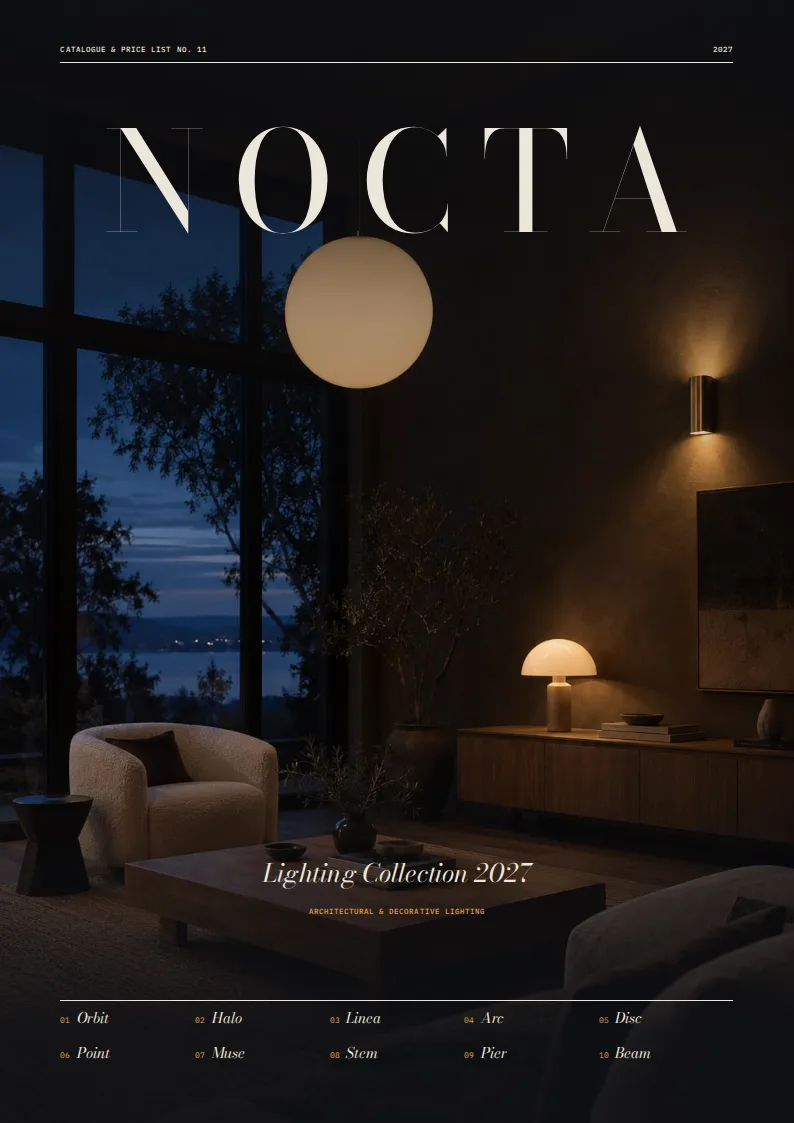
Inside the lighting catalog template
Built for lighting catalogs
- A4 portrait cover, contents, symbol guide, family spreads, and price list
- Dark image-led page facing a technical page for each family
- Dimension drawing, color-temperature scale, and finish swatches
- Variant tables and a closing code-to-price index
Columns your spreadsheet needs
One row per product. Name your columns like this, or map your own column names when you connect the spreadsheet.
| Column | What goes in it | Example |
|---|---|---|
category | Category | Pendants |
family | Product family | Orbit |
image | Product image | PD-101.jpg |
family_note | Family note | A single bubble of hand-blown opal glass. |
designer | Designer | Studio Nocta |
sku | Product code | PD-101 |
name | Variant name | Orbit Pendant Ø250 |
wattage | Wattage | 8 |
lumen | Light output | 806 |
color_temp | Color temperature | 2700 |
cri | Color rendering index | 90 |
ip_rating | IP rating | IP20 |
base | Lamp base | E27 |
dimming | Dimming | Phase-cut |
dimensions | Dimensions | Ø 250 × H 250 mm |
width_mm | Width in millimeters | 250 |
height_mm | Height in millimeters | 250 |
profile | Fixture profile | globe |
finish | Finish | Opal glass / brushed brass |
price | Price | 290 |
A collection story, followed by the details
This lighting catalog template is for lighting brands and manufacturers presenting pendants, wall lights, and other fixture families to retailers, designers, and specifiers. The cover sets an editorial tone with a full-page image and a list of product families. A contents page groups those families by category and points readers to each section.
Before the products, a guide explains the technical symbols and shows the finishes used throughout the catalog. Buyers can refer back to it when comparing wattage, light output, color temperature, CRI, and other specifications.
One facing-page spread per family
Each family gets a two-page spread. A dark, image-led page introduces the collection with its name and family note. Facing it, a technical page brings the buying details together: a row of specification symbols, a dimension drawing, a color-temperature scale, finish swatches, and a table of variants. The pairing gives an atmospheric product photo room to breathe without making buyers hunt for measurements or performance data.
Your spreadsheet can hold several variants under the same family. Give each one a sku and name, then supply its dimensions, wattage, lumen, color_temp, cri, ip_rating, base, dimming, finish, and price. The width_mm, height_mm, and profile columns provide the measurements and shape for the dimension drawing. Use image for the product photo and designer when you want to credit the collection’s designer.
A price list for quick reference
The closing price list gathers variants from across the families into a compact table. Buyers can scan by family, find a product code, and check its variant, technical values, and price without flipping between spreads. A final back page closes the catalog.
The layout is set up for A4 portrait pages; the supplied sample renders at 26 pages. It suits teams that currently assemble lighting catalogs and specification sheets by hand but already keep their product details in Excel, CSV, or Google Sheets. Attach the rows and product photos to create a print-ready PDF that carries both the visual story and the buying information.
Lighting Catalog Template, answered
Can I show several sizes of the same fixture?
Yes. Add a row for each size with its own SKU and specifications, and use the same family name to group them on a family spread.
Where do buyers find technical specifications?
Each family’s technical page brings together specification symbols, a dimension drawing, a color-temperature scale, finishes, and a variants table.
Does the catalog include a consolidated price list?
Yes. A price list near the back gathers the product variants so buyers can look up codes and prices across families.
What photo should I attach?
Add a product photo filename in the image column. The layout gives family imagery a prominent, atmospheric page beside the technical details.
What page size is this template designed for?
It is set up for A4 portrait pages. The supplied sample renders at 26 pages; your page count depends on your product families and variants.




Make your technical catalog from your spreadsheet
Start from this template, replace the sample data with your products and export a print-ready PDF.