Industrial Components Catalog Template
Turn a product spreadsheet into an A4 technical catalog organized by category and product family. Norden pairs branded cover artwork with detailed SKU tables for industrial buyers and sales teams.
- A4
- Portrait
- 1–89 pages
Inside the industrial components catalog template



Built for industrial components & tools catalogs
- A4 layout with cover, inside cover, and back cover
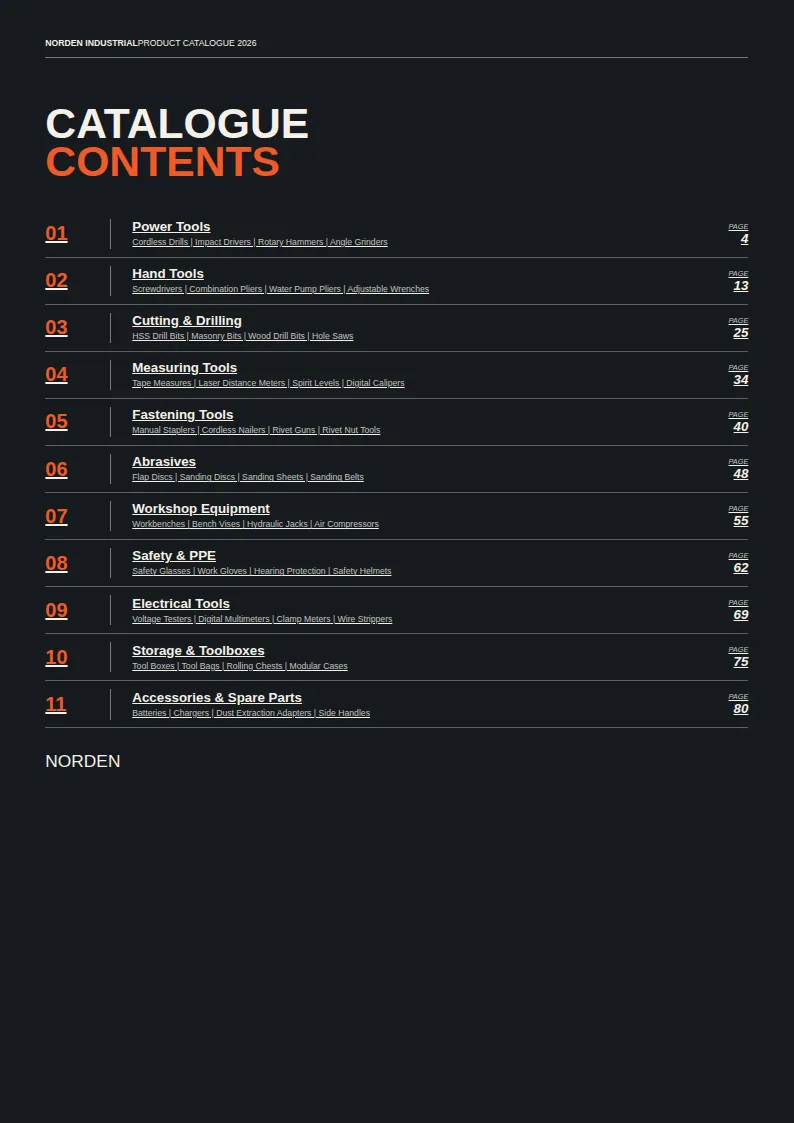
- Contents page and numbered category dividers
- Family-by-family tables with SKUs and product names
- Up to four technical-specification columns per family
- List prices marked as excluding VAT
- Two lined notes pages
Columns your spreadsheet needs
One row per product. Name your columns like this, or map your own column names when you connect the spreadsheet.
| Column | What goes in it | Example |
|---|---|---|
Main_Category | Main category | Power Tools |
Subcategory | Subcategory | Cordless Drills |
Code | Category code | PWT |
Product_Family | Product family | X18 Cordless |
SKU | SKU | NDN-PWT-0001 |
Product_Name | Product name | High-Torque Cordless Drill 18V |
Launch_Tag | Launch tag | NEW |
Bestseller_Tag | Bestseller tag | BESTSELLER |
A catalog built for large product ranges
Norden opens with full-page cover artwork and an inside cover, followed by a contents page listing each main category and selected subcategories. Numbered category dividers make the range easy to scan before the detailed listings begin. Within each category, product families appear under their own headings, so buyers can move from a broad section such as Power Tools to a range such as X18 Cordless.
The product pages use tables rather than individual product cards. Each row shows the SKU, product name, up to four technical-specification columns for that family, and a list price marked as excluding VAT. A NEW or BESTSELLER tag can appear beside the product name when supplied. Running headers and side tabs keep the category visible across the listings. The document closes with two lined notes pages and back-cover artwork.
Organize the spreadsheet around how buyers browse
Use Main_Category to define the catalog’s sections and Subcategory to add context on the contents page. Product_Family groups related products into tables; SKU and Product_Name identify each row. Category records also provide a Code for the divider label. Supply pricing and technical-specification data alongside the product and category data to fill the price and specification cells. Specification headings can differ between families, with up to four shown in each table.
This structure suits manufacturers and distributors whose buyers need to compare models by technical attributes and reference exact SKUs when ordering. It is especially useful for ranges with many closely related tools or components, where a compact table is more practical than a page per item.
Prepare an A4 PDF for print
Add your branded cover artwork and product data from Excel, CSV, or Google Sheets to produce a print-ready A4 PDF. The sample renders at 89 pages, but the length of your catalog depends on your categories, families, and product rows. Check the contents, table headings, prices, and specification values before sharing the finished catalog with buyers.
Industrial Components Catalog Template, answered
What appears in each product table?
Each row shows a SKU, product name, up to four technical-specification values, and a list price excluding VAT. A launch or bestseller tag can appear beside the name.
Can different product families have different specifications?
Yes. Each family table can have its own specification headings, with up to four displayed.
How are products grouped in the catalog?
Main categories create the contents entries and dividers. Within each category, products are grouped into tables by Product_Family, or by Series or Subcategory when a family is not supplied.
Does the catalog include product photos?
This layout uses branded artwork on the covers. The product listings are text-and-data tables rather than photo cards.
Will my catalog be 89 pages?
The sample renders at 89 pages. Your page count depends on the number of categories, product families, and SKU rows you provide.
Make your technical catalog from your spreadsheet
Start from this template, replace the sample data with your products and export a print-ready PDF.